
Technical SEO Checklist: 15 Things Every Website Must Get Right

A technical SEO checklist covers 15 things: crawlability (robots.txt, XML sitemaps, crawl budget), indexing (noindex tags, canonicals, duplicate content), site speed and Core Web Vitals, mobile-friendliness, HTTPS, structured data, site architecture and internal linking, broken links, and sitemap submission through Google Search Console. Get these right, and your content has a fair shot at ranking. Miss even one, and your best writing can sit invisible to search engines no matter how good it is. I’ve opened more client websites than I can count expecting a content problem, only to find a robots.txt file quietly blocking half the site instead.
Below, I walk through each of these 15 in detail, in the order I actually check them during a real audit. If you’ve been publishing solid content and still aren’t seeing movement in rankings, technical SEO is very often where the real issue is hiding, not in your writing. Professional SEO & Digital Marketing Teams include a full technical review as part of their free strategy audit.
What Is Technical SEO (and Why It’s Different from On-Page/Off-Page)?
Technical SEO is the practice of optimizing your website’s infrastructure, the parts search engines interact with before they ever read a single word of your content, so it can be crawled, indexed, and ranked properly. It’s a different discipline from on-page SEO (which deals with content, keywords, and meta tags) and off-page SEO (which deals with backlinks and external authority). Technical SEO is the plumbing underneath both.
I like how Rand Fishkin, Moz’s founder, has framed this relationship: strong technical SEO is what sets the stage for good content to actually get seen, by making sure the site itself is fast, crawlable, and built in a way search engines can trust. You can write the best article on the internet, but if Googlebot can’t crawl the page, or your site takes eight seconds to load, none of that content quality matters; it never gets the chance to compete.
That’s the core reason this checklist exists: technical issues are often invisible to the person running the site, because the site looks fine in a browser. Search engines see something different, and that gap is exactly where rankings quietly get lost.
Crawlability: Robots.txt, XML Sitemaps & Crawl Budget
This is always where I start an audit, because if a search engine can’t crawl your site properly, nothing else on this list matters yet.
1. Robots.txt:
Your robots.txt file tells search engines which parts of your site they’re allowed to crawl. I’ve seen more sites get hurt by this one file than almost anything else. Google’s own Search Central documentation is clear on the file’s real purpose: it’s meant to block pages you don’t want crawled at all, not to temporarily “save up” crawl budget for other pages, since Google won’t automatically redirect that budget elsewhere unless your server is already at its serving limit.

2. XML Sitemaps:
Your sitemap is the opposite of robots.txt: it’s the list of pages you do want crawled and indexed. The rule I follow religiously here is that the two files should never contradict each other. If a URL is blocked in robots.txt, it has no business appearing in your sitemap, and vice versa; mixed signals like that genuinely confuse crawlers. I also keep sitemaps clean, only canonical, indexable URLs, no redirects, no 404s, no parameter-stuffed duplicates, since a bloated sitemap dilutes the signal you’re sending Google about what actually matters on your site.
3. Crawl Budget:
This one matters far more for large sites than small ones, but the principle is universal: Googlebot only spends a finite amount of time and resources crawling any given site, and you want that time spent on pages that matter, not wasted on infinite pagination, filtered URL parameters, or soft-404 pages. One technical detail that surprises people: crawl budget can even be affected by your server’s DNS response time; a slow DNS lookup adds latency to every single crawl request, and across a large crawl session, that adds up to real wasted time that Googlebot interprets as a sign your server is overloaded.
Indexing Issues: Noindex Tags, Canonical Errors & Duplicate Content
Crawling gets a search engine to your page. Indexing decides whether it actually gets stored and shown in results. These are two separate steps, and a page can be crawled successfully and still never make it into the index, which is exactly why this section trips people up.
4. Noindex Tags:
A noindex tag tells search engines a page can be crawled but shouldn’t appear in search results, useful for things like thank-you pages, internal search results, or duplicate filtered views you want accessible to users but invisible to Google. The mistake I see most often isn’t misuse; it’s an accidental one: a noindex tag left over from a staging build that quietly ships to production and de-indexes a page nobody meant to hide. If your site was recently rebuilt or migrated, this is one of the first things I’d check through Google Search Console before anything else.
5. Canonical Errors:
A canonical tag tells search engines which version of a page is the “master” copy when duplicates exist, consolidating ranking signals onto one URL instead of splitting them across several. This sounds simple, but per Google’s own canonicalization guidance, the same handful of mistakes show up constantly: canonical tags pointing to a URL that’s blocked by robots.txt or tagged noindex (a direct contradiction that can make Google ignore the canonical entirely), canonical chains where page A points to B and B points to C instead of straight to the final URL, and missing self-referencing canonicals on pages that genuinely don’t have duplicates, which is still considered best practice even then.
6. Duplicate Content:
This is more common than most site owners realize, and it’s rarely intentional. An ecommerce store with 10,000 products can easily generate 40,000 accessible URLs once you account for color variants, size filters, sort parameters, and tracking codes, every one of them technically a separate page in Google’s eyes unless canonicals are set correctly. If you’re running a store specifically, this is a pattern I see constantly on ecommerce builds, where filtered category pages multiply URLs faster than most platforms warn you about. The fix isn’t deleting these URLs; it’s telling search engines clearly which version is the one that should rank.
One distinction worth being precise about, since I see it confused constantly: noindex removes a page from search entirely, while a canonical tag merges its ranking signals into another page instead. They solve different problems, and using one where the other belongs is one of the fastest ways to accidentally deindex a page you actually wanted ranking. A free tool like Screaming Frog can surface every conflicting canonical on a site in one crawl, which is usually where I start before going page by page manually.
Site Speed & Core Web Vitals
7. Core Web Vitals:
This is where I usually see the biggest gap between how a site feels to its owner and how Google actually measures it. Core Web Vitals are three field metrics: Largest Contentful Paint (LCP, loading speed), Interaction to Next Paint (INP, responsiveness), and Cumulative Layout Shift (CLS, visual stability). Google scores these using real Chrome user data over a rolling 28-day window, at the 75th percentile, meaning your site needs to perform well for the vast majority of real visitors, not just your own fast office wifi and new laptop.
A site only “passes” Core Web Vitals when all three clear their threshold together, and most sites don’t. According to the HTTP Archive Web Almanac, only 48% of mobile origins and 56% of desktop origins passed all three metrics in 2025.
| Desktop (all 3 passing) |
|
56% | ||
| Mobile (all 3 passing) |
|
48% | ||
| Mobile LCP pass rate |
|
62% | ||
| Mobile INP pass rate |
|
77% | ||
| Mobile CLS pass rate |
|
81% |
Source: HTTP Archive Web Almanac, 2025 Core Web Vitals pass rates.
LCP is consistently the metric most sites fail, which tracks with what I see in practice: unoptimized hero images and render-blocking scripts are usually the culprit. And this isn’t just a Google scorecard exercise. Google’s own web.dev case study repository documents real business impact:
| 28% more organic traffic for Nykaa after a 40% LCP improvement |
23% longer average session duration for Tokopedia after cutting LCP by 55% |
8.4% higher retail conversions from just 0.1 seconds faster mobile load time, per a Google/Deloitte study |
Speed isn’t a technical nicety here; it’s a direct revenue lever.

Mobile-Friendliness & Responsive Design
8. Mobile-Friendliness & Responsive Design:
Google has used the mobile version of your site as the primary basis for indexing and ranking since completing its mobile-first indexing rollout, which means your desktop site’s quality is nearly irrelevant if the mobile version falls short. This isn’t a minor consideration anymore; mobile devices now account for roughly 63-64% of all global web traffic, and in consumer-facing categories like retail and local services, that share climbs above 75%.
The mistake I see most often isn’t a lack of responsive design entirely; it’s content parity. If information, internal links, or structured data exist on your desktop site but are hidden, collapsed, or removed on mobile to save space, Google treats that content as if it doesn’t exist at all for ranking purposes. I’ve audited sites that looked complete on a desktop monitor and were missing entire sections on mobile because of an old “hide on mobile” setting nobody remembered was there.
A few specific things Google flags as mobile usability errors, straight from Search Console’s reporting:
| ✓ | Tap targets smaller than 48×48 pixels: buttons and links too small or too close together to tap reliably. |
| ✓ | Font sizes under 16px that force users to pinch-zoom to read. |
| ✓ | Horizontal scrolling caused by content wider than the viewport. |
The business case here isn’t abstract either. Per Think with Google’s research, 61% of users won’t return to a mobile site they had trouble accessing the first time, and that’s a permanently lost visitor, not a delayed one. If you’re weighing whether a mobile-friendly redesign is worth prioritizing, that single stat is usually enough to answer the question.
Genuinely responsive, mobile-first builds are default on everything we ship through web design and development, specifically because retrofitting mobile parity onto a desktop-first site after the fact is a much bigger job than building it right the first time.
HTTPS & Security
9. HTTPS & Security Signals:
Google confirmed HTTPS as a ranking signal back in 2014, and it’s stayed active ever since. It’s not a heavyweight signal on its own; Google has described it as lightweight compared to content quality, but its real impact is compounding: it removes the “Not Secure” browser warning, unlocks the faster HTTP/2 and HTTP/3 protocols (which directly help your LCP score), and it’s practically a prerequisite for user trust once someone’s about to enter payment or contact information.
I actually ran into this exact issue firsthand while auditing a client site earlier this year; several CSS and font files were still loading over http:// despite the site’s core settings showing https:// everywhere, buried in a cached asset file nobody had thought to check. That’s the trap with HTTPS: having a valid certificate isn’t the same as having a fully secure site. Mixed content, where an HTTPS page still loads some resources (images, scripts, fonts) over plain HTTP, affects roughly 18-20% of all HTTPS websites according to HTTP Archive’s 2026 data, and it’s almost always invisible unless you actually check your page source or run it through a scanner.
The business case is measurable, not theoretical. Migrating from HTTP to HTTPS correctly delivers an average organic traffic increase of 5-10%, per data compiled by Moz and Search Engine Journal, and among page-one, position-one results specifically, 97.2% are already running on HTTPS according to Ahrefs’ most recent study. On the flip side, GlobalSign’s research found that sites without HTTPS see a dramatic spike in visitors abandoning the page before it even finishes loading; once that warning triggers, most people just don’t wait around to find out if the site is trustworthy.
One practical note if you’re planning a migration yourself: the certificate is the easy part. The redirects, updated canonical tags, and mixed content cleanup are where migrations actually go wrong, and where temporary ranking dips usually come from if they’re skipped. This is exactly the kind of thing that gets caught during ongoing website maintenance rather than discovered months later when someone finally opens dev tools.
Structured Data / Schema Markup
10. Structured Data / Schema Markup:
Schema markup is code, almost always written in JSON-LD, that explicitly tells search engines and AI systems what your content actually means, not just what words are on the page. I’ve built this exact type of markup directly for service pages before, writing Service schema with Organization, address, and hasOfferCatalog properties so search engines don’t have to guess what a business offers; they can read it directly from structured data instead of inferring it from paragraph text.

This used to be a “nice-to-have” that mostly earned you star ratings and FAQ dropdowns in search results. That era is genuinely over. In Google’s own case studies:
| 25% higher click-through rate for Rotten Tomatoes on pages with structured data |
82% higher CTR reported by Nestlé on pages appearing as rich results |
| 58% vs 41% of all search clicks now go to rich results versus standard blue-link listings |
2.5x / 40% higher chance in AI-generated answers, and up to 40% more AI Overview appearances with schema coverage |
What’s changed more recently is the AI layer on top of all this. Both Google and Microsoft have confirmed they use schema markup to power their generative AI features.
That FAQPage change is worth knowing specifically because so much existing advice online is now out of date: Google removed the visual FAQ dropdown from search results entirely in May 2026, after years of it being manipulated with keyword-stuffed FAQ sections that had nothing to do with genuine user questions. The visual perk is gone, but well-structured FAQ content is still doing real work behind the scenes for AI citation, which is exactly why I still write dedicated FAQ sections into the SEO work I do, just without expecting the old-style rich snippet anymore.
One practical note: Google recommends JSON-LD specifically over the older Microdata and RDFa formats, since it lives in a clean script block instead of being tangled through your HTML, which makes it far easier for both search engines and AI crawlers to parse without errors.
Site Architecture & Internal Linking
11. Site Architecture:
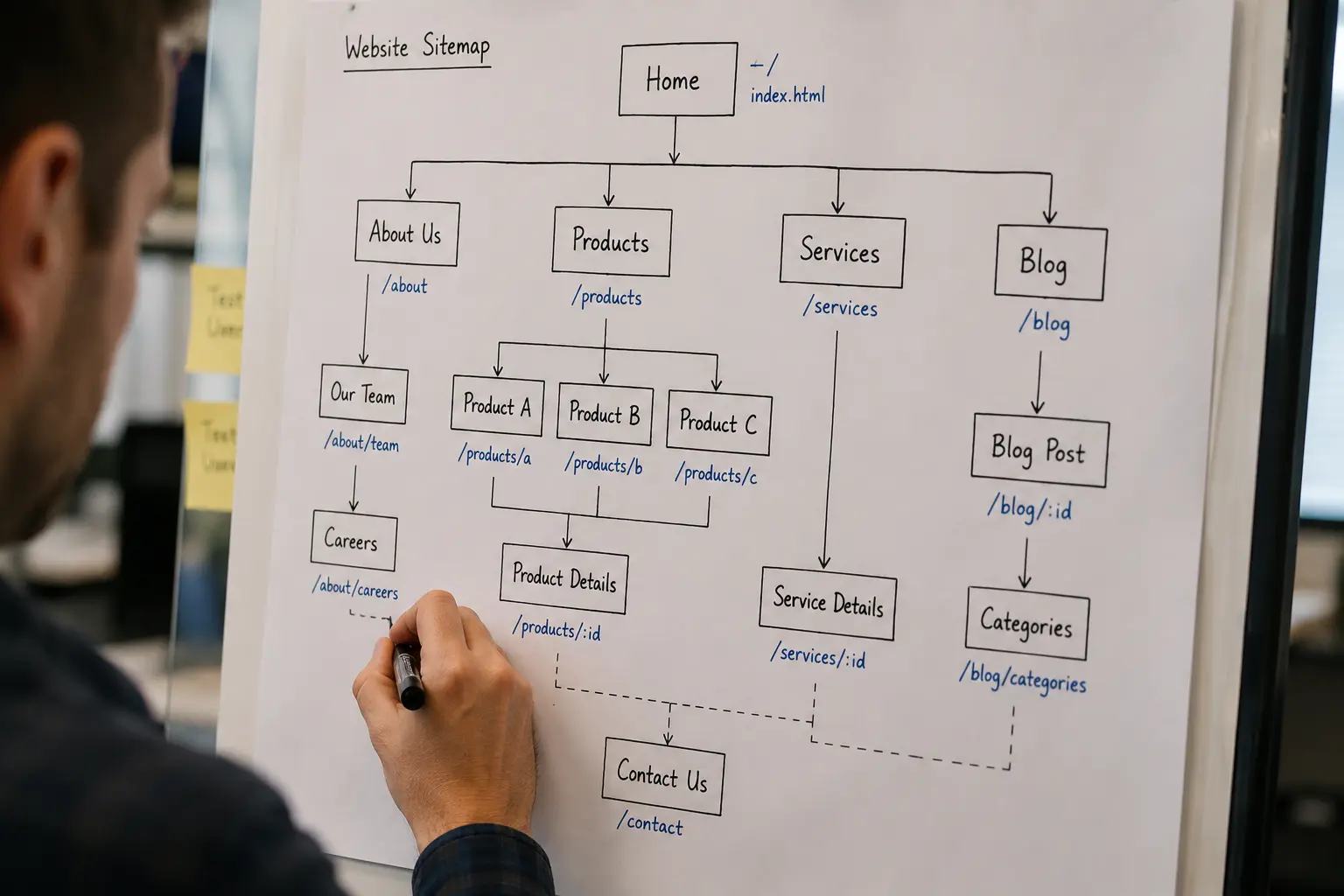
How you structure your site (the hierarchy of categories, how content relates to other content) determines whether search engines see your site as a coherent, authoritative resource or as a pile of disconnected pages. The dominant model for 2026 is what’s called pillar-cluster architecture: a broad “pillar” page comprehensively covers a topic, while narrower “cluster” pages handle specific subtopics and link back up to the pillar. That two-way linking pattern concentrates topical authority in one place and signals to Google that your content on a subject is a coherent body of work, not scattered, unrelated posts.
The structural target that actually matters is click depth, how many clicks it takes to reach a page from your homepage. A widely cited study from My Rankings Metrics found that pages sitting at a depth of 1-3 clicks generate roughly 9 times more organic traffic than pages buried deeper. Pages four or more clicks deep face a real, measurable risk: they get crawled less often and read as less important, precisely because the site’s own structure treats them that way.
12. Internal Linking:
This is the mechanism that actually builds that architecture, page by page. Internal links pass what’s called “link equity”, ranking authority flowing from strong, well-linked pages toward the ones you actually want to rank. I’ve been doing exactly this throughout every piece of content I write, deliberately linking new blog posts back to relevant service pages and other related posts, rather than treating each page as an island.
One mistake I see constantly, and try hard to avoid myself: link stuffing, cramming in exact-match anchor text repeatedly just to hit a keyword target. It reads as unnatural to users and can actually work against you, since it looks manipulative rather than genuinely helpful. The better test I hold myself to is simple: would I include this link if I weren’t thinking about SEO at all, because it genuinely helps the reader get to something relevant? If yes, it stays.
Broken Links & 404 Errors
13. Broken Links & 404 Errors:
Here’s a nuance worth being precise about, since a lot of SEO content oversimplifies it: Google’s own guidance is that 404 errors are not, by themselves, a direct ranking penalty. A 404 is treated as a normal part of how the web works: pages get deleted, content gets retired- that’s expected. What actually hurts you is everything that happens around the 404: users bouncing immediately, lost link equity if a page with real backlinks suddenly disappears, and wasted crawl budget as Googlebot keeps hitting dead ends instead of your important pages.
And the indirect effects are genuinely significant. Sites with broken links see meaningfully higher bounce rates than sites without them, and mobile users in particular are far less forgiving; they’re considerably more likely to abandon a site entirely after hitting a dead link than desktop users are. If you’re running any paid campaigns, this compounds further: a broken landing page doesn’t just lose the visitor, it can drag down your Google Ads Quality Score, making every future click on that campaign more expensive.
My actual rule of thumb: a 301 redirect beats a 404 almost every time a page has moved, been merged, or been replaced by something more current, since it preserves whatever link equity and backlinks that old URL had built up. Straight-up deleting a page with no redirect in place is one of the fastest ways to quietly lose ranking value you already earned. The genuinely good news here, and I mean this, is that fixing broken links is one of the highest-ROI technical fixes available. It takes minutes per link, not weeks like content or backlink work, and you’ll usually see the benefit reflected within a single crawl cycle.
XML Sitemap Submission (Google Search Console)
14. XML Sitemap Submission:
I touched on sitemap structure back in the Crawlability section; this piece is specifically about the submission and monitoring step, which people skip more often than you’d think. Building a clean sitemap and never actually submitting it to Google Search Console (or submitting it once and never checking back) leaves real value on the table.
The process itself takes about a minute: in Search Console, go to the Sitemaps report, enter your sitemap path, and submit. A “Success” status confirms Google fetched and read the file without errors. The part almost everyone skips is what happens after submission. Google itself has said sitemaps don’t directly boost rankings, but in practice, they consistently help new sites and larger sites get indexed noticeably faster, since you’re actively pointing crawlers toward everything you want found rather than waiting for them to stumble onto it through links alone.
15. Monitoring the Coverage Report:
Once submitted, the real work is checking back. The Index Coverage report tells you exactly which submitted pages actually got indexed, which were excluded, and why. Gaps between “discovered” and “indexed” are common, and they’re usually the first sign something else on this checklist (a stray noindex tag, a canonical conflict, thin content) is quietly working against you.
FAQs
How often should I run a technical SEO audit?
For most small-to-mid-sized sites, a full audit every 3-6 months is reasonable, with lighter monthly checks on the basics (broken links, Core Web Vitals, indexing status). Sites that publish frequently, run ecommerce, or have recently migrated or redesigned should audit more often, since those are exactly the situations where new technical issues tend to creep in unnoticed.
Can I fix technical SEO myself, or do I need a developer?
Some of this checklist is genuinely accessible without coding experience, checking your robots.txt, reviewing Search Console’s Coverage report, spotting obvious broken links. Others, like fixing canonical chains, implementing schema markup correctly, or resolving Core Web Vitals issues tied to your site’s actual code, usually require either development skills or a technical SEO specialist who can go in and fix the underlying cause, not just flag the symptom.
Which of these 15 items should I fix first?
I’d prioritize in this order: crawlability and indexing issues first, since if search engines can’t crawl or index your pages, nothing else on this list matters yet. After that, HTTPS and mobile-friendliness, since both affect every page on your site at once. Site speed, structured data, and internal linking are still important, but they’re refinements on a foundation that needs to be solid first.
Do technical SEO issues get fixed automatically after I make a change?
No, and this trips people up constantly. Google needs to recrawl and reprocess a page before it reflects your fix, which can take anywhere from a few days to a few weeks depending on your site’s crawl frequency. You can speed this up slightly by requesting indexing for specific URLs through Search Console’s URL Inspection tool, but there’s no way to force instant reprocessing.
Is technical SEO a one-time project or an ongoing task?
Ongoing. New pages get added, plugins update, themes change, and any of those can quietly introduce a new noindex tag, a broken link, or a Core Web Vitals regression without anyone noticing until rankings slip. This is exactly why we treat it as a recurring part of website maintenance rather than a box you check once and forget.
Does technical SEO matter for AI search visibility too, or just traditional Google rankings?
Both, and increasingly the two overlap more than people expect. Clean crawlability, structured data, and fast, accessible pages aren’t just what Google’s traditional algorithm rewards; they’re also what AI systems like ChatGPT, Gemini, and Perplexity rely on to understand, verify, and decide whether to cite your content in an AI-generated answer. A technically broken site is invisible to both.
Bringing It All Together: The Full 15-Point Checklist
Here’s every item from this guide in one place, the same list I actually walk down during a real audit.
Final Thoughts
If there’s one thing I hope sticks after all fifteen of these: technical SEO isn’t a single project you finish and move on from. It’s closer to the maintenance you’d do on anything else that needs to keep working reliably; small issues compound quietly over time, and the sites that stay healthy are the ones that check on this regularly, not the ones that only look when rankings have already dropped.
None of these fifteen items require guesswork to diagnose. Every single one shows up clearly in the right tool: Search Console, a crawler like Screaming Frog, PageSpeed Insights, if you know where to look. That’s genuinely the good news here: technical SEO problems are usually easy to find once you’re looking for them. They’re just invisible if you never check.
